
Text message verification
Intended sends text messages only when a member asks for them in the app.
What we send
- Verification codes. A one-time code to confirm the mobile number a member entered in the Intended app.
- Guardian messages (optional). If a woman turns on the family guardian feature, the guardian she names receives a code to confirm his number and, later, a link to approve or decline a match she has accepted.
We never send marketing or promotional text messages.
How members opt in
- A member creates a Intended account in the iPhone or Android app.
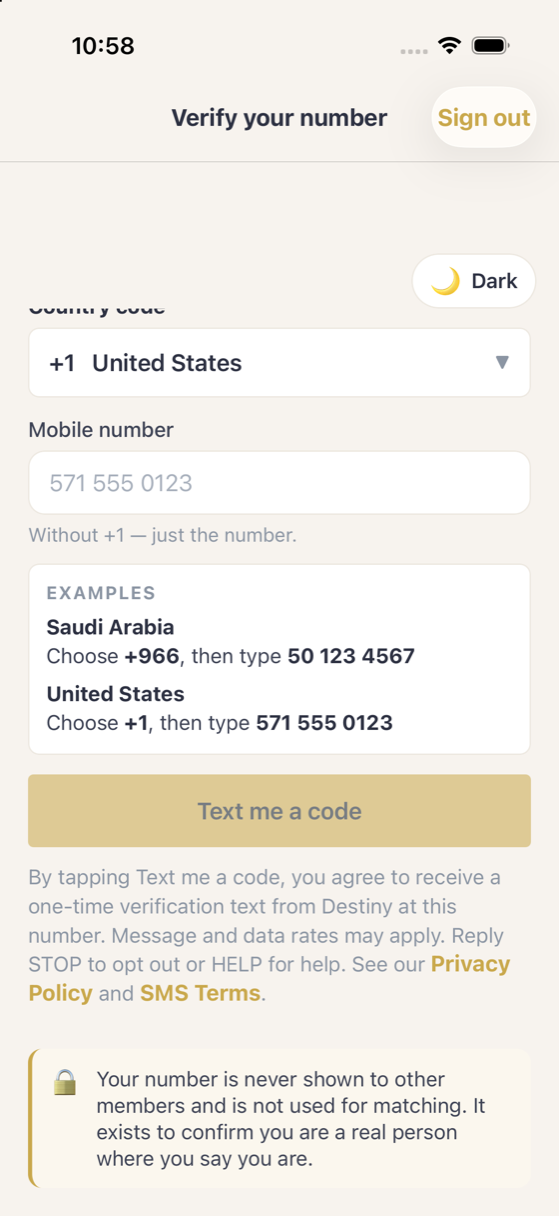
- On the Verify your number screen, they choose their country code and type their own mobile number.
- They tick an unticked consent checkbox. Text me a code stays disabled until they do.
- Beneath the button, the app states message frequency, rates, STOP and HELP, with links to the Privacy Policy and SMS Terms.
- Only when they tap Text me a code is a single verification text sent to the number they entered.
Frequency, cost and help
- Frequency: one message each time a code is requested. Guardian messages are sent only when the member triggers them.
- Cost: message and data rates may apply.
- Opt out: reply
STOPat any time. - Help: reply
HELP, or email support@empowertcl.com.
We do not sell or share mobile numbers or text message consent with third parties or affiliates for marketing or promotional purposes. See the Privacy Policy and SMS Terms.